Tablature editor for Mac and Windows
Write tab.
Hear your own tone.
Tonograph reads and writes .gp files, and plays what you wrote through a signal chain you build yourself. It runs entirely offline and needs no account.


The free version, for macOS, does everything except write to disk.
Tonograph at a glance
- 23
- pedal models in 10 categories
- 27
- MCP tools for your AI client
- .gp · .gpx
- files opened, and .gp written back
- Mac · Win
- macOS 12.0 or later, Windows 10 or later
- $29.99
- once in each store, no subscription
Included with the app
Hear it first
3 pieces ship with the app. Everything you hear was synthesised by the app itself — no sample libraries, no external plug-ins.
In the app · 3 pieces
Scarlet Engine and Rosewood Letters play as excerpts; Lágrima plays in full. Scarlet Engine and Rosewood Letters were written for Tonograph, and are yours to use freely. Lágrima is Francisco Tárrega’s and is in the public domain; the tablature and fingering are ours.
Six things it does well
From the first note you type to the page you print — and, new in 1.1, the guitar you plug in.
A real editor
Keyboard-first, with undo on every operation, multiple tracks and voices, and standard notation beside the tab.
The editor →- New in 1.1
Plug in your guitar
Tune to the track, hear yourself through its pedalboard, and play notes straight into the score.
Guitar input →- Tuner
- Play through the pedalboard
- Audio note input
- Real-time recording
Resonance Engine
23 pedal models across 10 categories, and a mixer for every track.
Resonance Engine →Fretboard, keys, pads
The panel under the score lights up as it plays, and takes input when it stops.
Instruments →AI, inside the app
An AI client reads and edits the open score over MCP, can wait for your approval before anything changes, and checks the notation it wrote.
AI (MCP) →
Resonance Engine
Play the score with your own tone
Most notation apps hand playback to a fixed sound set. Tonograph sends it through a pedalboard you arrange yourself, so the phrase you just wrote comes back in the tone you actually play.
Real pedals, in order
Drag to reorder, bypass, and save presets. Overdrive, fuzz, modulation, delay, reverb, amp and cabinet.
Articulation reaches the sound
Palm mutes, dead notes, harmonics, slaps and taps change the tone, not just the volume.
Nothing to download
Every instrument is synthesised in the app. No sample packs, no external plug-ins.
New in 1.1
Plug in your guitar
Connect an audio interface or a microphone. The sound is processed on your computer and is never stored or sent.
A tuner that follows the track
It reads the tuning of the track under the cursor and picks out the string you’re closest to. Every string you’ve tuned stays marked.
Play through the pedalboard
What you play runs through the pedalboard of the track under the cursor: the same amp, drive and delay the score plays through.
Each note you play, at the cursor
Play a single note and it’s written at the cursor with the current note value. Tonograph tells from the tone which string you used.
Record in real time
After a bar of count-in, play along with the click. Your take is quantized and written into the track as a single step you can undo.
Model Context Protocol
Write with AI, inside the app
Point an AI client such as Claude Desktop at Tonograph and describe the change. It works on the score you have open, not a copy.
In approval mode each edit is shown first and waits for your yes. What you approve lands in the same undo history as your own edits.
The model asks for an image of the bars it touched and reads the notation back before it answers.
Included in the free version. Only saving and exporting are held back.
Light and dark, both native
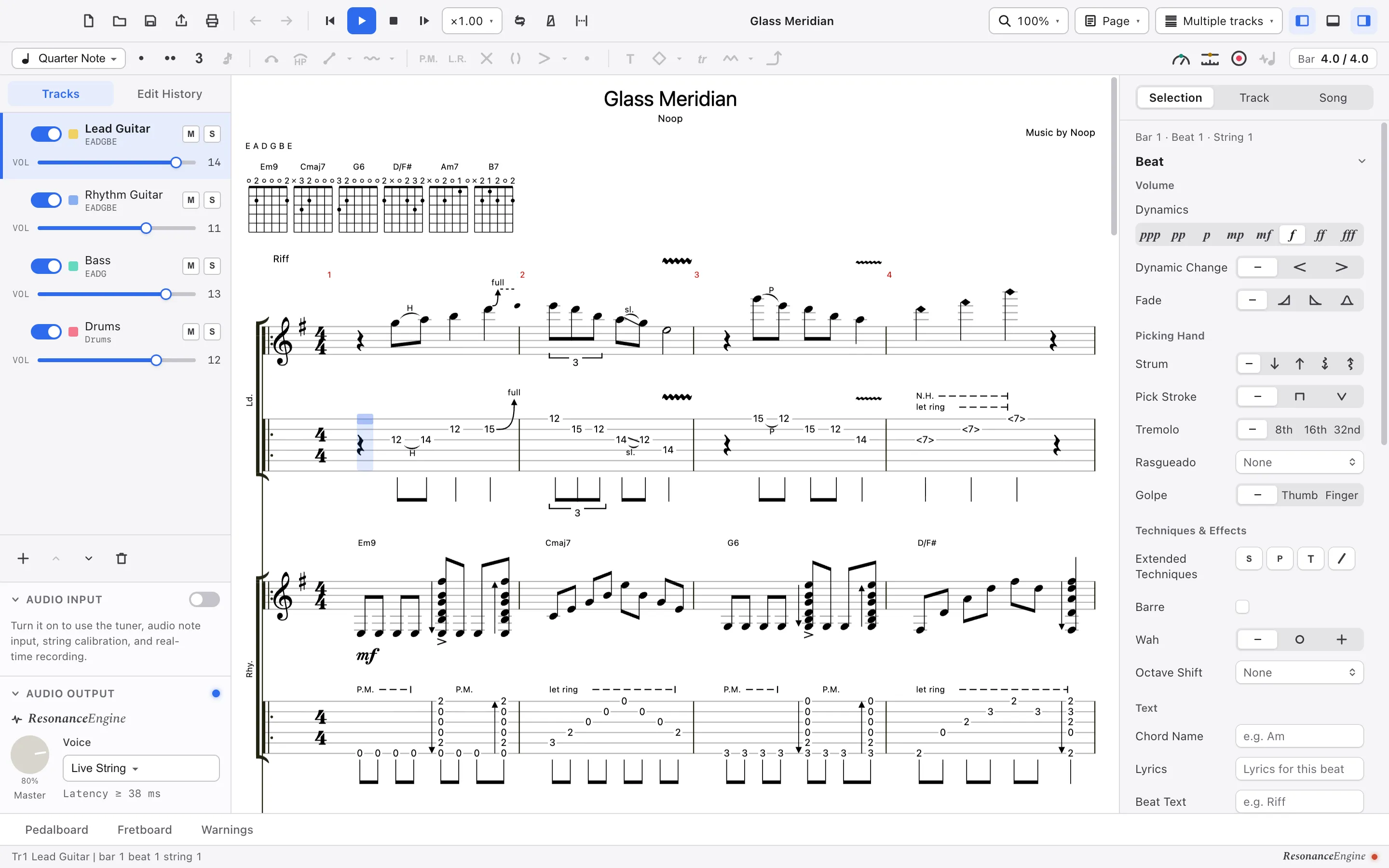
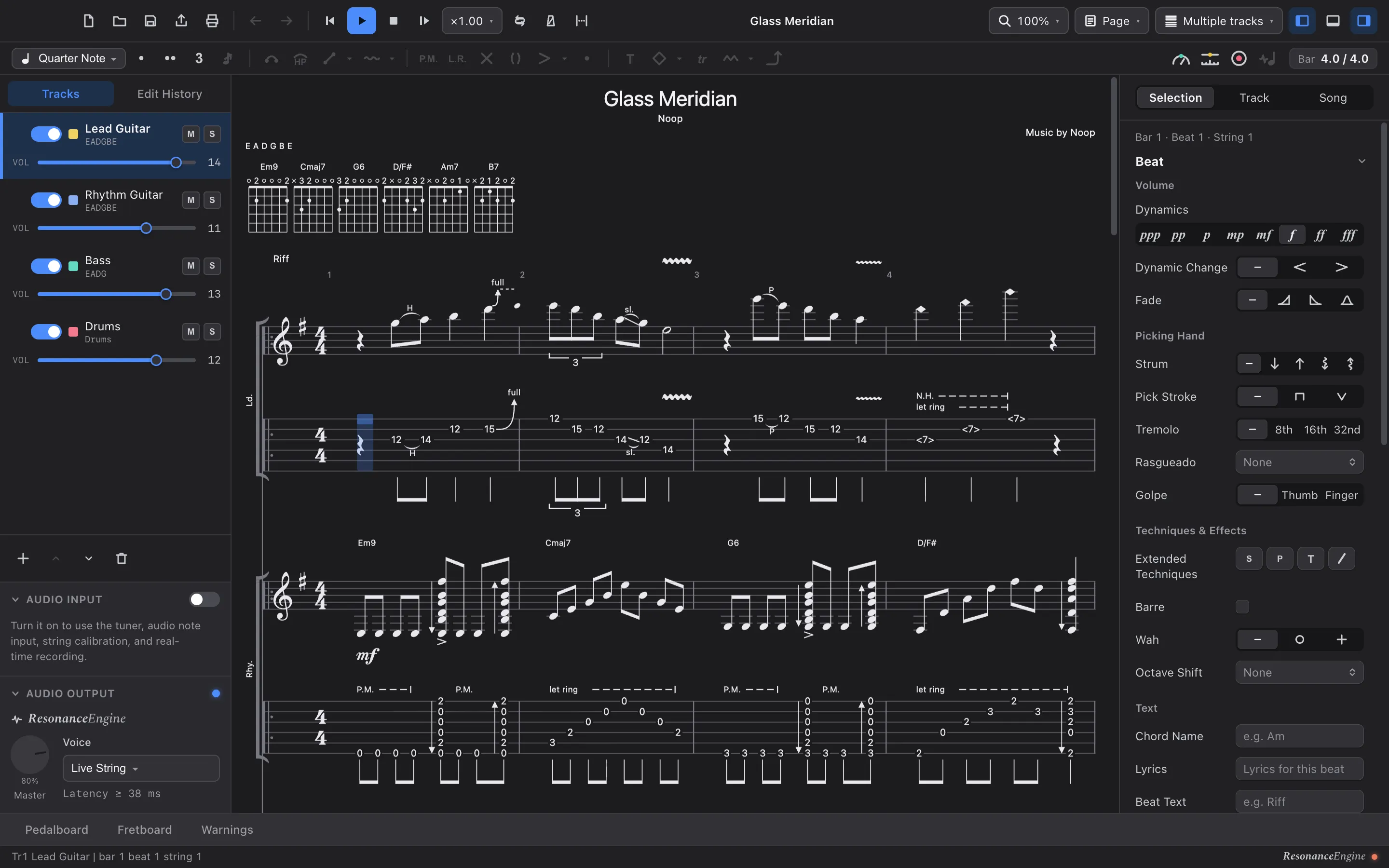
A single window that follows your system appearance, on macOS and on Windows. Drag across to compare.
Software you own
One-time purchase
Bought once, on the Mac App Store or the Microsoft Store. There is no subscription.
Fully offline
Every feature works with no network connection.
No account
There is nothing to sign up for and nothing to sign in to.
No telemetry in the paid version
The paid version collects nothing about you, your computer or your scores. The free version sends anonymous usage counts, which you can turn off.
Made by one person, in the open
Tonograph is built at Noop, LLC. by Kazuyuki Hayashi — who we are, and why this exists.
Free and paid
One rule decides everything: the free version does everything except write to disk.
See the full comparison →| Feature | Free | Paid |
|---|---|---|
| Open .gp (Guitar Pro 7 / 8) / .gpx (Guitar Pro 6) files | Included | Included |
| Resonance Engine (23 pedal models, mixer) | Included | Included |
| Guitar input — tuner, audio note input, real-time recording | Included | Included |
| AI (MCP) — reading and editing | Included | Included |
| Save (.tonograph) | Not included | Included |
| Export .gp | Not included | Included |
| Export PDF, and print | Not included | Included |
Questions
- What is the difference between the free and paid versions?
- The free version opens, edits and plays scores, works with AI, and takes input from a guitar. It cannot save, print, or export .gp, PDF, MIDI or audio (WAV). Nothing else is held back.
- Can I open my Guitar Pro files?
- If they are .gp (Guitar Pro 7 / 8) / .gpx (Guitar Pro 6) files, yes — Tonograph reads them and writes .gp back. Scores saved by Guitar Pro 5 or earlier (.gp3 / .gp4 / .gp5) have to be converted to .gp in Guitar Pro 8 first. Tonograph is not affiliated with Arobas Music.
- Does it need an internet connection?
- No. Every feature works offline. The paid versions send nothing anywhere. The free version checks for a newer version once a day and sends anonymous usage counts — never your scores — which you can turn off in Settings.
- Which computers are supported?
- macOS 12.0 or later, on both Apple Silicon and Intel. Windows 10 or later, on x64 and ARM64. The free version is for macOS only.
Start with the free version
Open your .gp files, play them through the Resonance Engine, and decide afterwards.
The paid version is $29.99, a one-time purchase in each store. The Mac App Store and Microsoft Store versions are bought separately.