.gp export and the loss checkPaid version
Export your song as a .gp file. If anything would be lost in the export, you're told first.
Export a .gp file#
Press ⌘⇧ECtrl+Shift+E and choose where to save.
Exporting doesn’t change where the open song is saved. Saving to the .tonograph file is still done with ⌘SCtrl+S.
The loss check#
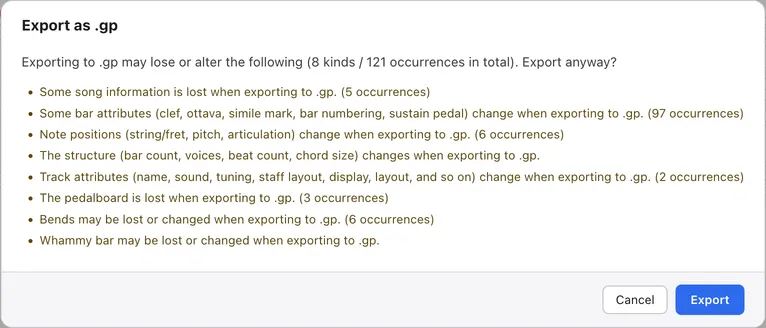
If anything can’t be represented in a .gp file, a list of it appears before the export.
The list shows a count for each kind. To export anyway, press Export. If nothing would be lost, the save dialog opens without asking.
What gets lost#
The pedalboard and system breaks can never be written to a .gp file.
Some techniques and parts of the song’s structure may also not fit the .gp format and be replaced with something close. The confirmation dialog tells you what would be lost for each song.
Songs opened from a .gp file#
For a song opened from a .gp file, only the parts you changed are written back into the original file.
If you haven’t edited anything, the result has the same content as the original. Songs you created and songs opened from a .tonograph file get a .gp file built from scratch.