Instruments and sounds
Choosing a track's sound program decides the instrument and the sound. The sound decides which pedalboard the track plays through.
Choose the sound program#
Choose the track’s sound program with Sound (GM) on the Track tab of the inspector.
The list is grouped by instrument family, and you can also type the number directly. Sound (GM) in the track properties is the same setting. Drum tracks have no program setting; they always play with the drum sounds. The program is saved in the song and exported to .gp files.
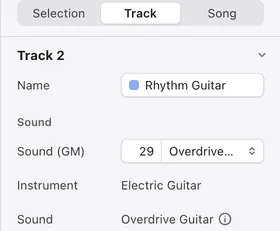
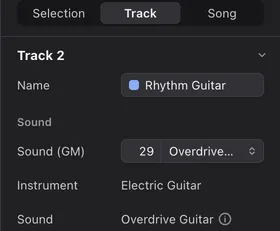
The instrument and sound rows#
Below the program, the inspector shows the Instrument and Sound it decides.
Instrument tells you what sounds, and Sound tells you how the sound is shaped. Both follow automatically from the program; you can’t choose them directly. When a track has its own pedalboard, the Sound row shows Dedicated pedalboard.
How the program maps to sound#
Guitar and bass tracks always sound like plucked strings, whatever program you choose.
The program decides which stringed instrument is played and which pedalboard it goes through. For example, every electric guitar program plays the same guitar; the difference comes from the pedalboard. A program that doesn’t fit guitar or bass plays as a clean electric guitar (or an electric bass on a bass track).
Keyboard tracks such as piano change sound by program family. Differences within a family don’t change the sound. Drum tracks always sound like drums; changing their program field makes no difference.
Sounds and pedalboards#
Tracks with the same Sound play through the same pedalboard.
How it works explains how boards are chosen. Piano and drum tracks only go through pedals when you give them a board of their own.
When the sound changes mid-song#
If a .gp file changes the sound partway through the song, playback switches sound at that point.
The score shows the name of the new sound. When you stop, the original sound returns and the track’s program setting is unchanged. Tonograph can’t add or remove these changes.