General
Set the autosave interval and what happens when a note value change makes a bar too long or too short.
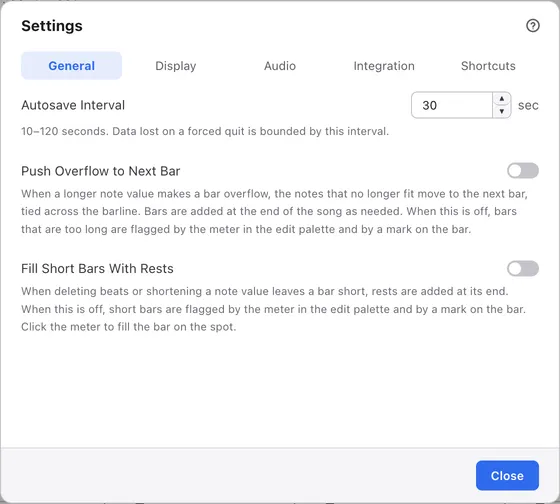
1Tabs
Switch between kinds of settings. Opening the dialog from the menu always starts on this tab.
2Autosave Interval
How often, in seconds, unsaved changes are backed up. It starts at 30 seconds. Autosave is a feature of the paid version; the free version doesn’t make backups. See Saving and autosave.
3Push Overflow to Next Bar
When a longer note value makes a bar overflow, moves the notes that no longer fit into the next bar, tied across the barline. Bars are added at the end of the song as needed. It’s on at first. See Matching bar length.
4Fill Short Bars With Rests
When deleting beats or shortening a note value leaves a bar short, adds rests at its end. It’s off at first, and while it’s off, short bars are flagged by the meter in the edit palette and a mark on the score. See Matching bar length.
Usage data (free version)#
In the free version, this tab also has a Usage data section.
It controls whether anonymous usage data is sent. See Free and paid versions.