TunerNew in 1.1.0
Play your guitar to read its pitch and tune the strings to the tuning of the track under the cursor.
Open the tuner#
Open the tuner with Tuner… in the edit palette or with .
If audio input is off, the tuner shows a Turn On Audio Input button. Clicking it turns input on, just as the setting does. See Input settings to prepare the input.
Reading the tuner#
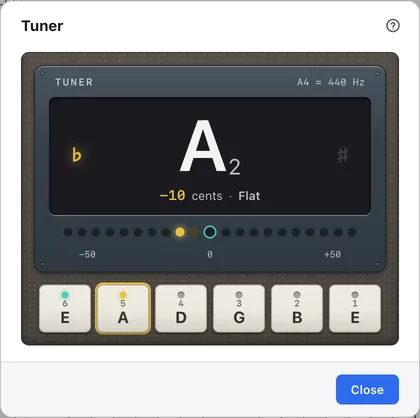
Play one string at a time: the display shows the note and how far off it is, and the row of LEDs shows the size of the difference.
1Reference pitch
The frequency being read as A. It shows the value of Tuner reference (A4) in the settings.
2Note name
The name and octave of the note being played.
3Difference
How many cents the note is from the nearest note, and whether it’s high or low.
4Flat and sharp lamps
♭ lights when the note is too low, and ♯ when it’s too high.
5Row of LEDs
The centre means in tune. The bigger the difference, the further from the centre the lit LED is.
6Strings of the current track
The strings of the track under the cursor, from the lowest string up.
7Nearest string
The key of the string closest to the note being played lights up.
8tuned
A string that stays in tune for a moment gets a mark. The marks stay until you quit the app.
Tune the strings#
Play one string at a time and turn the tuning peg until the LED is in the centre and it says In tune.
The tuner tells which string it is from the pitch. The string keys follow the track’s tuning and don’t take a capo into account. The tuner only reads sound; it doesn’t play anything through the speakers.